
Alipay for foreigners: how to set it up before you fly
Checked
Short answer
Get ready: your phone number from home, a card from home and your passport.1, 2, 3
Set it up before you fly: register, add your card and give your passport details when the app asks.
Pay in China: scan the shop’s QR code, or show your payment code.
Get ready
- Your phone number from home. You can register Alipay with it before you arrive in China.1 Keep it able to receive text messages during the trip: the app or your bank may send a code when you pay.
- A card from home, in your own name. You can add UnionPay, Visa, Mastercard, JCB, Diners Club and Discover cards.4 American Express works only if the card was issued by American Express directly — not by another bank.5 Only you can use your card — you can’t share it with a travel partner.3 Bring a second card from another bank in case the first doesn’t work.
- Your passport. The app asks for its details before your first payment with the card.3
Set it up a few days before you fly, so there is time to try another card if the first one won’t link.
Set it up before you fly
-
Download Alipay from the App Store or Google Play. It has an English-language interface.1
-
Open it and register with your phone number from home.1
-
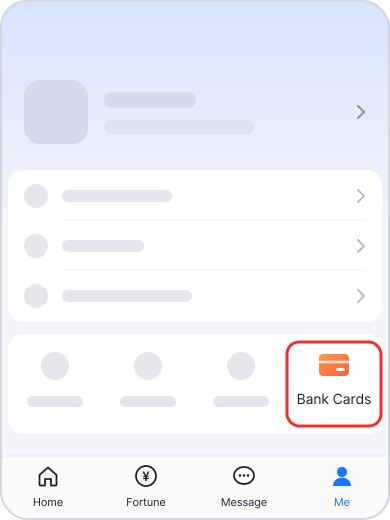
To add your card, tap Me, then Bank Cards.1
-
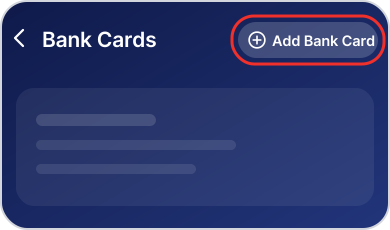
Tap Add Bank Card at the top right. Enter the details the app asks for, such as the card number, expiry date, security code and your name.3
-
The app asks for your passport details before your first payment with the card: enter them as the screens show.3 If it hasn’t asked by the time you fly, it will ask at your first payment in China. The app may then show “ID validated – not authenticated” and suggest verifying a Chinese bank card. Ignore that — you can still pay, up to a limit the app shows you.
You’re set when your card shows under Me › Bank Cards. You can’t test a payment from home — Alipay only works for payments at shops in mainland China, not in Hong Kong or Macao.3 It works once you land.
Pay in China
Tap Scan, scan the shop’s QR code, enter the amount if asked, and confirm. Or open your payment code and let the cashier scan it1: tap Pay/Collect at the top of the home screen.
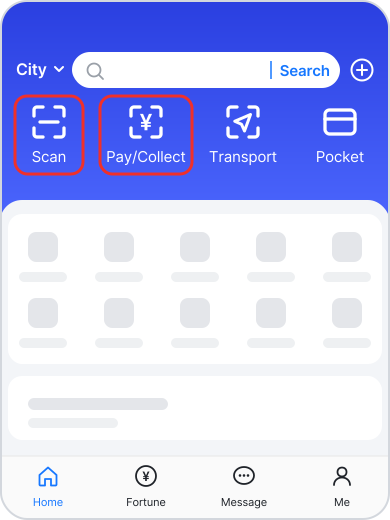
You don’t need to top up the Alipay balance: each payment is taken from your card.
You can pay at shops, but you can’t send money to people or take out cash.3 Pay a private driver or guide in cash.
More on when to use your card or cash instead: How to pay in China.
When it doesn’t work
Your card won’t link
Some cards don’t work — it depends on your bank and whether the card is Visa, Mastercard or another brand.1 Try a card from another bank, or set up WeChat Pay instead.
The app says “not authenticated”
You can pay while the app shows “ID validated – not authenticated.” Payments go through up to a limit the app shows you, and the check usually completes once you land in mainland China.
A payment is turned down
At some small shops and stalls, your card won’t work — they use the owner’s personal payment code, which doesn’t take cards from home. The app says the shop does not support your payment method. Pay cash there. If your card is turned down at a bigger shop, switch to another card. If every payment fails, call your bank: it may be blocking payments from China.
Your account is restricted
Call Alipay’s customer service. English hotline: +86 571 2688 6000, or 0571 2688 6000 from a Chinese number.4 The in-app appeal sometimes works, sometimes doesn’t — set up WeChat Pay as a backup.
Fees and limits
Alipay charges no fee on a payment of 200 yuan or less with a card from home, and 3% of the total on a larger payment. The payment page shows the fee before you confirm. Checked .2, 3 Any foreign transaction fee from your bank comes on top.
For foreign visitors paying by phone, one payment can be up to US$5,000, and a year’s payments up to US$50,000.2, 6 Alipay may set its own limits, and your bank’s limits apply too.3
More on cards and fees: Can you use your credit card in China?
Updated
Sources
Every rule on this page links to the official page it comes from: 6 pages in all, checked between November 13, 2026 and November 15, 2026.
Show all sourcesHide sources
- 1Shanghai Municipal People's GovernmentHow to use mobile payments in Shanghai
Download the Alipay app and register with your mobile phone number.
You can register with an overseas number before arriving in China. If you later get a Chinese SIM card, you can update your registered number in the app.
Alipay is available on iOS and Android and offers an English-language interface.
Step 3: Pay with Alipay
Scan the merchant's QR code: Open the Scan function, scan the merchant's QR code, enter the amount if required, and confirm the payment.
Display your payment code: Open your payment code and have the cashier scan it.
Open Alipay and go to: Me > Bank Cards
Whether a card can be linked may also depend on the card network and the issuing bank.
- 2Shanghai Municipal People's GovernmentPay with overseas bank cards
International visitors can link eligible bank cards issued outside the Chinese mainland to Alipay or Weixin Pay (WeChat Pay) without opening a bank account in the Chinese mainland.
Service fees for overseas bank cards linked to Alipay or Weixin Pay:
A transaction of 200 yuan or less is generally exempt from the platform's service fee.
A transaction above 200 yuan may incur a service fee of 3 percent of the full transaction amount.
Check the payment page for applicable fees and promotional exemptions before confirming a payment.
Transaction limits for overseas bank cards linked to Alipay or Weixin Pay:
Single transaction limit: Up to $5,000.
Annual cumulative limit: Up to $50,000.
Check the app for the limits applicable to your account.
- 3Alipay · In ChineseNotice of update to the User Service Agreement《用户服务协议(User Service Agreement)》更新公告
Before paying with the Bank Card for the first time, you shall submit the information of your passport or Exit-Entry Permit for Travelling to and from Hong Kong, Macao, and Taiwan according to the page prompts.
You shall ensure that the information you submitted is owned by yourself, that you are be the holder of the Bank Card used in the service, and that you are using the service solely on your own account.
To use this service, you shall submit or confirm necessary information for using the service as prompted on relevant pages (for example, your name, Bank Card number and its valid term, card security code, or billing address, with the specific information fields being subject to page prompts
The information submitted or confirmed by you will be submitted to the relevant International Card Organizations for verification.
you may pay for your purchase from merchants within the People’s Republic of China (for the sole purpose of this Agreement and for the avoidance of any doubt, this does not include the Hong Kong Special Administrative Region, the Macao Special Administrative Region and Taiwan)
You can only use this service to pay for your purchase from the PRC Merchants and shall not use this service for the purpose of money transfer, wealth management, cash withdrawal or other non-consumption purposes.
Our translationBased on business developments, we have the right to charge you a reasonable transaction service fee, and may adjust the service fee as business development requires. We will clearly inform you of the transaction service fee standards (including adjusted standards), with the details subject to the fee announcement listed on the service page or the fee standards set out in other ways.
基于业务发展情况,我们有权向您收取合理的交易服务费,并可根据业务发展需要对服务费进行调整。我们会向您明示交易服务费用标准(含调整后的标准),具体以服务页面所列的收费公告或以其他方式列明的收费标准为准。
When you use this service, we will set payment limits based on the situation of business and have the right to adjust such payment limits based on any policy adjustment and/or business change, with the details being subject to page prompts. In addition, you shall comply with relevant business rules of the Bank Card issuers, such as maximum single payment and caps for daily or monthly accumulative payment.
- 4People's Bank of ChinaGuide to Payment Services in China
UnionPay, Visa, Mastercard, JCB, Diners Club, and Discover cards can all be added to Alipay.
English Service Hotline
Alipay
+86-571 2688 6000
Please dial 0571 2688 6000 if you are using a Chinese number.
- 5AlipayAmerican Express and Alipay to Enable Seamless Payments for International Travelers in China
All eligible global American Express Card Members1 can now link their Cards to the Alipay digital wallet, enabling seamless and secure payments at tens of millions of merchants across the Chinese mainland.
American Express Cards issued by third parties outside of the Chinese mainland are currently not eligible to be added to the Alipay Digital Wallet.
- 6The State Council of the People's Republic of China (gov.cn)Payment service guide for overseas visitors to China
The single transaction limit for overseas visitors using mobile payments on payment platforms has now been raised from 1,000 U.S. dollars to 5,000 dollars. The annual cumulative transaction cap has been increased from 10,000 dollars to 50,000 dollars.
Each small number in the text is one of the 6 official pages under Sources at the end, checked between November 13, 2026 and November 15, 2026.
Where this comes from